

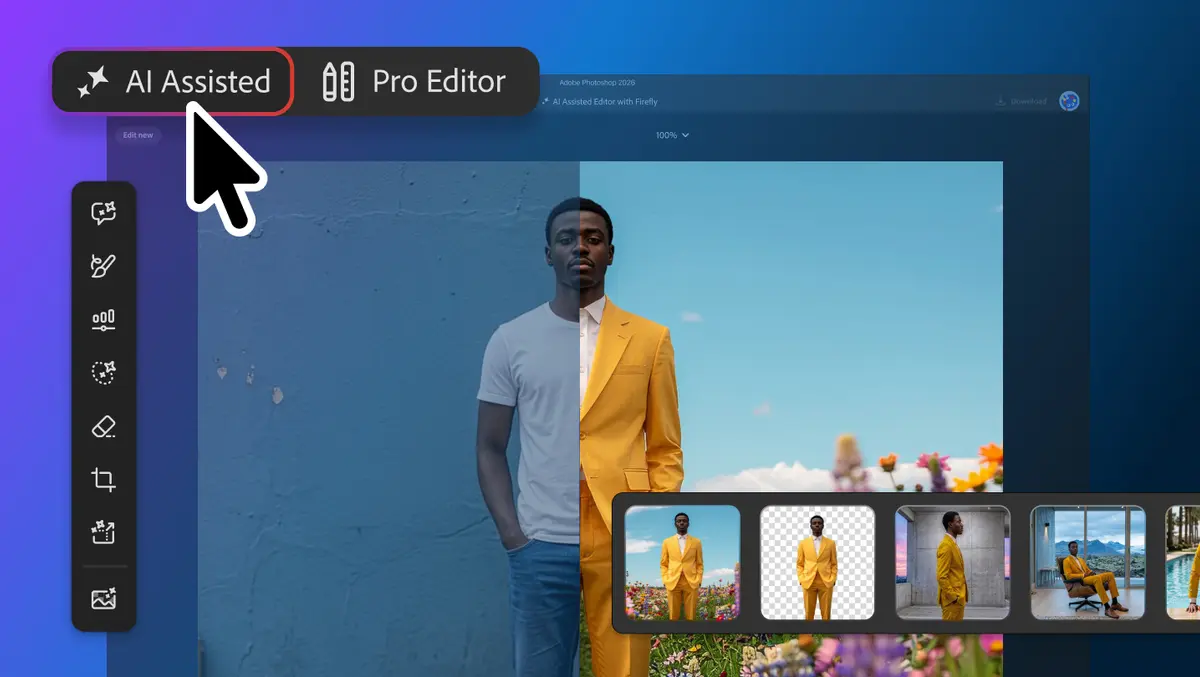

Adobe has expanded Photoshop with a beta AI Assisted Editor and a series of editing tools aimed at giving users more control over generative AI and conventional image workflows.
The updates include natural-language image editing, mask-aware AI changes and visual markup. Adobe has also added non-destructive lighting controls and deeper Adobe Stock integration.
Editing controls
A new Light Adjustment Layer brings Exposure, Contrast, Highlights, Shadows, Whites and Blacks controls into Photoshop's layers workflow. The feature is designed to provide lighting adjustments comparable with those available through Camera Raw without requiring users to leave their existing layer structure.
Adobe has also introduced Instruct Edit with Masks, powered by Firefly Image 5. The feature uses the context of an image and a user's prompt to make changes within masked areas.
Users can request specific changes, such as opening closed eyes or adding a hat to a particular person. Areas outside the mask remain unchanged, allowing users to protect elements such as faces, logos and brand assets while applying generative edits elsewhere.
Markup provides another method for directing AI-powered changes. Users can draw directly on an image to indicate the areas or elements they want altered.
The tool can be used to select areas for recolouring, draw arrows to indicate positioning or sketch rough shapes representing elements that should be added. This gives the AI model visual instructions alongside text prompts.
Workflow changes
Photoshop's Dynamic Text feature has been extended to custom shapes and paths. Text can automatically adapt along curves and freeform layouts while retaining its formatting.
The change is intended to reduce manual adjustments when designers modify the shape or path used to position text.
Adobe Stock is also being integrated directly into Photoshop through a dockable Stock Panel. The panel provides access to more than 900 million Adobe Stock assets.
Users can search, preview and use assets within Photoshop rather than moving between the application and a separate stock content interface.
The additions expand Photoshop's conventional editing controls at the same time as Adobe increases the role of generative AI within the application.
AI editor
Adobe has introduced AI Assisted Editor in beta as an optional Photoshop workspace for users who want to edit images primarily through natural-language instructions.
The interface provides a dedicated prompt bar alongside generative editing tools. It sits alongside Photoshop's existing Pro Editor rather than replacing the established editing workspace.
Prompt to Edit allows users to transform images through written instructions without carrying out the equivalent changes manually.
The AI Assisted Editor also includes Remove Background for separating subjects from backgrounds and refining edges. Generative Expand can extend the dimensions of an image and generate content for the newly created space.
The Remove Tool is available for deleting unwanted objects and other image elements. Generative Fill can add, replace or remove content based on text prompts.
Generative Upscale is designed to increase image resolution while retaining image detail. AI Markup provides visual annotation controls for directing generated changes.
The collection gives users several ways to specify an intended result. They can provide a text prompt, use markup to indicate changes visually or work with Photoshop's established selection and editing controls.
Prompt workflow
Adobe is also bringing Prompt to Edit into the Pro Editor through Photoshop's Contextual Task Bar.
This allows users to apply natural-language instructions to an entire image from the existing editing interface. A selection is not required before submitting a prompt.
Each result generated through Prompt to Edit is placed in the layer stack as a generative layer. This keeps the original image separate from the generated changes and allows users to continue working with Photoshop's layer-based editing system.
The approach gives users the option of moving between manual editing and prompt-driven changes within the same project. Users who prefer a dedicated prompt interface can instead work through AI Assisted Editor.
Photoshop's latest changes also expand the ways users can direct generative models. Instruct Edit with Masks constrains changes to selected areas, while Markup adds visual instructions and Prompt to Edit handles broader natural-language changes.
The new tools sit alongside the application's existing layer, path, text and image adjustment workflows, with AI Assisted Editor available as an optional beta interface.